


Member Tools
4.36.56K Reviews
App Specs
- Version
- 5.6.0-(108555.3281444)
- Updated On
- License
- Free
- Downloads
- 1,000,000+
- Developer
- The Church of Jesus Christ of Latter-day Saints
- Categories
- Books & Reference
- Platform
- Android, iOS
Screenshots
 Analysis by AppCompare
When I first opened Member Tools, I understood its purpose quickly: it is a practical Books & Reference app for people who want church-related contacts, calendars, meetinghouse information, and temple details in one place. I found it less like a reading app and more like a daily reference desk that happens to travel with you. That distinction matters, because its value appears when I am trying to complete a real task, not when I am simply browsing.
The app is developed by The Church of Jesus Christ of Latter-day Saints and is free to use. It is rated for Everyone, which makes the interface and general purpose approachable for a broad audience. With more than a million installs and an average rating of 4.3 from roughly thirty-eight thousand ratings, it has clearly become a familiar tool for many members. I would not choose it as a general religious reading library, but I would choose it when I need current practical information connected with participation in local church life.
From a vague need to a useful answer
When my need is still vague, I find it useful to turn it into one concrete next step: identify a person, check an event, or establish where I need to be. That small choice keeps the lookup focused and makes it easier to notice when the task has moved beyond what a member reference tool is meant to handle. It also sets up the next question: how smoothly does the app cope when several of those needs arrive at once?
The starting condition: I need information while I am already moving
The most convincing use case is not sitting at home and exploring every screen. It is the moment when plans are already in motion. Imagine that I am preparing to attend an event, trying to contact another member, or checking where a meetinghouse or temple is located. Normally, I might search through old messages, open a browser, check a calendar, and then look for an address separately. That process creates small delays and increases the chance of using an outdated detail.
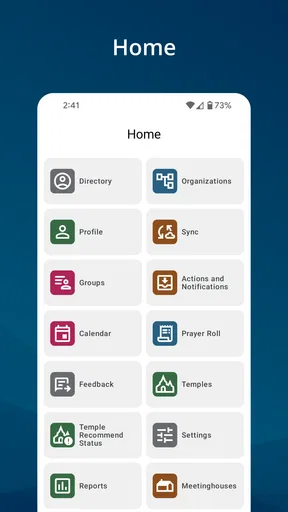
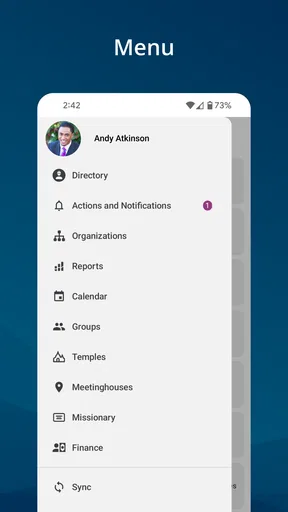
Member Tools brings those related jobs into one member-focused workspace. I can begin with the problem rather than with a broad search. If I need a person, I look for contact information. If I need to know what is happening, I move to the calendar. If I need to get somewhere, I use the location tools. The app’s strength is this short path between a real-world question and the relevant church information.
That focus also explains who should skip it. Someone looking for a broad collection of books, independent study tools, or a general Bible reader will probably find a different app more suitable. Member Tools is not trying to replace every religious reference app. Its usefulness depends on whether I need member-oriented organization and local access rather than a large reading experience.
Starting with contacts instead of hunting through messages
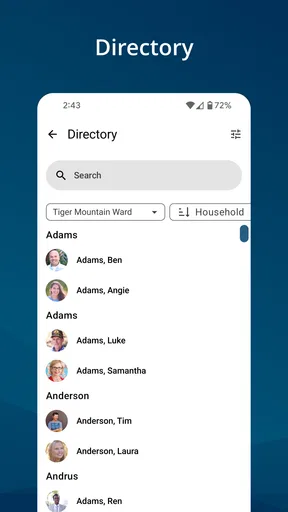
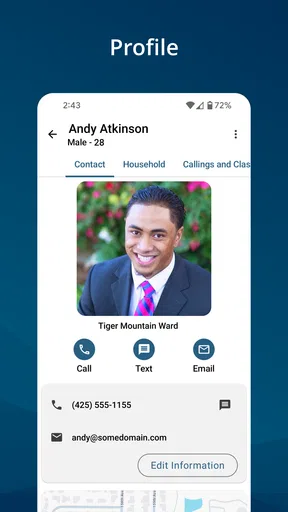
Contact information is one of the areas where the app feels most practical. In everyday life, I may remember a person’s name but not the best way to reach them, or I may need to identify the right person connected with a local responsibility. Opening a dedicated member directory is more direct than searching through conversations and hoping an old phone number is still the one I need.
Worth Reading Before You Choose

EA SPORTS FC Mobile 26 Is a Bigger Football Game, but It Takes Time

Flipboard Shows What News Apps Must Do Beyond the Feed

Switching to Android Auto Means Rethinking Your Driving Routine

Google Calendar Makes a Crowded Week Easier to Manage

Ludo King Makes the Most of the Minutes Between Plans

Baby Panda World Brings Quick Play to Modern Phones, but Its Game Library Feels Busy
I also like the difference between finding information and acting on it. A directory is useful only if it helps me move to the next step: making contact, confirming an arrangement, or passing a detail to someone else. That handoff is where a specialized tool can save time. Instead of copying a name from one place, searching for it elsewhere, and then returning to the original task, I can keep the lookup inside the same member-oriented workflow.
There is a sensible privacy trade-off here. A centralized directory is convenient, but I would still treat the information as personal and use it respectfully. I would not assume that every contact is appropriate for every purpose, and I would double-check the person before sending a message about a time-sensitive activity. The app can reduce searching, but it cannot replace ordinary care when handling someone else’s details.
Moving from the calendar to the destination
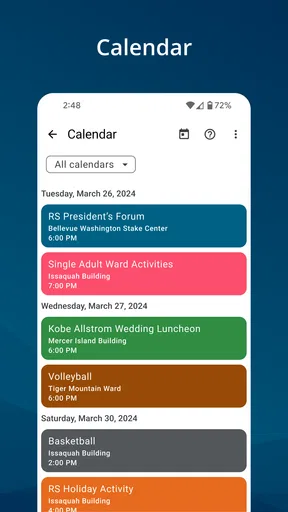
The calendar becomes more useful when I connect it to a place. An event entry may tell me what is happening, but the next question is often where I need to go. Member Tools is designed around that handoff: I can move from planning to location instead of treating the schedule and destination as unrelated pieces of information.
A realistic example would be a busy weekday evening. I check the calendar before leaving work, confirm the event, and then use the meetinghouse or temple information to orient myself. If another person is joining me, the contact section helps me confirm the plan. The outcome is modest but valuable: I leave with the event, the people involved, and the destination considered together.
I would still check the details before starting a long trip. A calendar can tell me that something is scheduled, but it does not automatically solve every travel question. Traffic, parking, building access, and last-minute changes remain practical concerns outside the app’s central job. My advice is to use Member Tools for the authoritative starting point, then allow enough time for the parts of the journey it cannot manage.
Using meetinghouse and temple information in the field
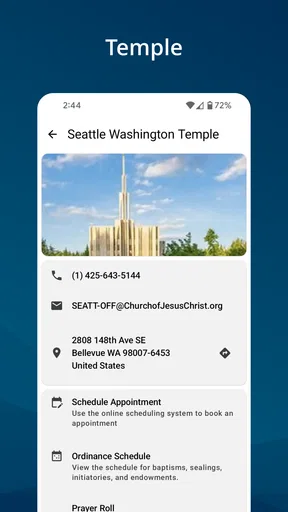
The location features are most helpful when I am away from my usual routine. I may be visiting another area, helping someone find a building, or checking which temple is relevant to a plan. Instead of relying on memory or a broad web search that may return unrelated results, I can begin with the app’s church-specific locations.
This is one of the less obvious advantages of having contacts, calendars, and places together. The individual tools are straightforward, but the handoff between them is what makes the app useful. I can identify an event, connect it with a location, and then communicate with the person who needs the information. That chain is more valuable than any single screen considered on its own.
I would not confuse this with a complete navigation replacement. For turn-by-turn directions or detailed traffic planning, a dedicated maps app may still be better. Member Tools helps me identify the relevant church location and begin the journey; another navigation tool may handle the final route more effectively. That division of labor feels sensible rather than disappointing.
What the handoffs feel like in practice
The app’s workflow has several handoffs: from a person to a contact method, from an event to a date and place, and from a location to the next action. I find these handoffs more important than visual polish because they determine whether the app actually helps during a busy day. A screen can look clean, but if I have to repeatedly leave it and reconstruct the context, the convenience disappears.
Member Tools generally makes sense when I already know what I am trying to accomplish. I can open it with a question such as “Who should I contact?”, “What is happening this week?”, or “Where is the building?” That directness keeps the experience approachable. I do not need to understand a complicated system before getting value from it.
The limitation is that a focused workflow can feel narrow when my question falls outside those main tasks. If I want extended reading, broad historical research, or a flexible personal note system, I would reach for another app. Member Tools works best as a companion to participation, not as a complete replacement for every other digital tool I use.
Version, compatibility, and day-to-day expectations
The current release is version 5.6.0-(108555.3281444), and it requires Android 8.0 or later. That makes checking the operating system worthwhile before installing it on an older device. I appreciate that the app has a clearly defined compatibility floor, but anyone using an aging phone should confirm compatibility first rather than discovering the limitation during an urgent task.
Because the app deals with information that can change, I would also make a habit of opening it before an important appointment rather than relying only on something I viewed weeks earlier. This is a useful workflow tip: use the app as a current reference at the point of planning, then share the confirmed result with the people involved. That reduces the risk of passing along a stale date, contact detail, or location assumption.
The free price removes an obvious barrier for someone deciding whether to try it. That does not mean it will be equally useful to everyone. Its value comes from relevance: members who regularly need local contacts, event information, meetinghouses, or temples are likely to benefit more than casual readers searching for general reference material.
Where the flow breaks
The first possible break is an information gap between what I expect and what the app is designed to provide. If I open it hoping for a rich reading environment, I may feel that it is too operational. Its Books & Reference classification should not be mistaken for a traditional digital bookshelf. I see it as a reference and coordination tool with a church-specific purpose.
The second break happens when the app identifies the right place but I need more travel detail. A meetinghouse or temple listing can be the correct starting point, yet I may still need a separate navigation app for the best route. This is not a serious flaw, but it means the complete journey may involve another tool. I prefer knowing that in advance rather than expecting one app to handle every stage.
The third break is human rather than technical: the app can help me find a contact, but it cannot decide whether contacting that person is appropriate or whether the information is still relevant to my situation. I should verify names, dates, and plans before acting, especially when coordinating several people. The app shortens the administrative part of the task; judgment remains mine.
A fourth limitation is that the app’s usefulness depends on my connection to the church context it serves. Someone outside that context may not have a reason to return to it regularly. Even a well-organized tool can feel unnecessary if its core information does not match the reader’s life. In that case, a general calendar, contacts app, maps service, or religious reading app would likely be a better fit.
Who gets the most from Member Tools?
I would recommend it first to members who need a dependable way to connect people, activities, and places. It is especially suitable for someone who attends events in different locations, helps coordinate others, or often needs to confirm practical details while away from home. The app can also be useful for a person who dislikes keeping information scattered across text messages, notes, and browser tabs.
It is less compelling for someone who only wants inspirational reading or a simple scripture library. In that situation, a dedicated reading app may offer deeper tools for highlighting, study, and long sessions with text. Likewise, someone whose only need is driving directions will probably get a faster result from a navigation app. I see Member Tools as the best option when several small church-related tasks meet in the same day.
The result: fewer searches, clearer next steps
After following the workflow from need to outcome, the result is not dramatic automation. It is a reduction in scattered effort. I can begin with a person, event, or place and reach the next action with fewer detours. That matters when I am already late, coordinating a group, or visiting an unfamiliar area.
My favorite practical habit is to use the app in two passes. First, I check the information early enough to notice conflicts. Later, just before leaving or contacting someone, I check it again and use the current details. This approach treats the app as a planning tool and a final reference, rather than assuming that an earlier glance is enough for the whole day.
The experience is also easier when I decide what outcome I want before opening it. “Find the person,” “confirm the event,” and “locate the building” are better starting points than aimlessly browsing. That simple change makes the app feel faster because I am using its structure instead of asking it to behave like a general search engine.
My recommendation after using the complete workflow
Member Tools is a focused, free app that earns its place through practical connections between contacts, calendars, meetinghouses, and temples. I would install it if those tasks are part of my regular routine, particularly because keeping them together can make coordination less frustrating. The strong adoption and 4.3 average rating suggest that many people find this focused approach worthwhile, while the Everyone rating makes it broadly approachable.
I would not recommend it as the only app for religious study, navigation, or personal organization. Its best quality is also its boundary: it concentrates on member-facing tasks instead of trying to become everything at once. Once I accept that, the workflow is clear. I start with a real need, locate the relevant person, event, or place, complete the handoff, and use another specialized tool only when the task moves beyond Member Tools’ role.
My final view is simple: choose Member Tools when participation and coordination are the problem you want to solve. It is most helpful when a calendar entry needs a location, a location needs a person, or a person needs a prompt next step. For those situations, it feels like a sensible pocket reference. For general reading or broad navigation, I would choose something else and let this app do the narrower job it handles best.
Pros
- Centralizes member data and tools in one convenient app.
- Helps organizations communicate updates to members quickly.
- Simplifies access to membership information and resources.
- Useful for managing routine member-related tasks on the go.
- Clean layout makes core features easy to find and use.
Cons
- Some features may depend on the organization’s account setup.
- New users may need time to understand all available tools.
- Notifications can become excessive if many updates are enabled.
- Limited value for users whose organization rarely updates content.
- Performance may vary with older devices or slower connections.
FAQs for Member Tools
What is Member Tools used for?
Member Tools is designed to help organizations manage their members, contacts, and administrative information from a mobile device. Depending on the organization using it, the app may provide access to member directories, announcements, events, resources, forms, or account details. Its exact features can vary, so the experience may differ between clubs, associations, churches, schools, or other groups.
Do I need an invitation or membership to use Member Tools?
In most cases, Member Tools is intended for registered members of an organization rather than the general public. You may need an existing membership, an invitation, or login credentials supplied by your organization before you can use the main features. If you cannot sign in, check whether your email address is registered or contact the organization’s administrator for account activation and access instructions.
Is Member Tools free to download and use?
The application may be available to download without an upfront charge, but access and pricing can depend on the organization that provides it. Some groups include Member Tools as part of their membership, while others may require paid membership or charge for specific services outside the app. Review the store listing and your organization’s terms before downloading.
What personal information does Member Tools require?
Because Member Tools can be connected to an organization’s membership system, it may handle information such as your name, email address, phone number, profile details, membership status, or event participation. The information visible to you and other members depends on administrator settings. Before creating an account, review the app’s privacy policy and your organization’s data-sharing rules.
What should I do if Member Tools is not working or I cannot access my account?
First, confirm that your device has a stable internet connection and that Member Tools is updated to the latest version available for Android or iOS. Try closing and reopening the app, checking your login details, or using any password-reset option provided. If the issue continues, contact your organization’s administrator, since account permissions and membership records are often managed outside the app.


